Ch 1 - Getting started
Welcome — this is my personal Rust knowledge base built while working through The Rust Programming Language (2021 Edition).
It’s mainly designed for my understanding — a quick place to collect notes, mental models, and occasionally over-specific details that I personally find useful.
Installing rustup on Linux or macOS
Open a terminal and run the following command:
curl --proto '=https' --tlsv1.2 -sSf https://sh.rustup.rs | sh
What you get from this installation:
rustc— the Rust compilercargo— Rust’s build system and package manager- Toolchain management (stable / beta / nightly)
Once the installation completes, you should see:
Rust is installed now. Great!
To finish the setup, make sure Rust is added to your environment and verify the installation:
» . "$HOME/.cargo/env"
» rustc --version
rustc 1.93.0 (254b59607 2026-01-19)
At this point, the Rust compiler (rustc) and Cargo are installed and ready to use.
If you are working on a fresh machine and may not have a linker, be sure to install one using the commmand below:
For Linux: apt-get install build-essential
For macOS: xcode-select --install
What is Cargo?
Cargo is the tool you will interact with most of the time when writing Rust.
It is responsible for:
- Creating new Rust projects
- Downloading and managing dependencies (crates)
- Building your project
- Running tests
- Invoking the compiler and linker for you
In practice, you almost never run rustc directly. Instead, you use commands like:
cargo build
cargo run
cargo test
Behind the scenes, Cargo orchestrates the entire build process.
How Rust builds a program (compiler + linker)
Rust is a compiled language with a strong emphasis on compile-time correctness. Compilation does not immediately produce a runnable program.
Instead, the process is split into two distinct stages:
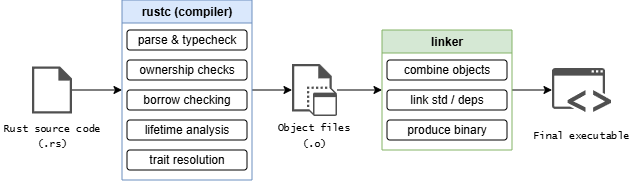
1. Rust compiler (rustc): correctness and code generation
Before anything can be linked, Rust code goes through an extensive compile-time pipeline handled by rustc.
At a high level, rustc performs:
- Parsing & type checking: Ensures the program is syntactically valid and types are consistent.
- Ownership checks: Verifies that every value has a clear owner and that ownership rules are respected.
- Borrow checking: Enforces Rust’s aliasing and mutability guarantees at compile time.
- Lifetime analysis: Ensures references never outlive the data they point to.
- Trait resolution: Determines which trait implementations apply at each call site.
Once these checks succeed, the compiler generates object files — compiled machine-code fragments that are not yet runnable on their own.
At this point, Rust has proven that the program is memory-safe and well-typed, but it has not produced an executable yet.
2. System linker: assembling the final program
After compilation, control is handed off to a system-level linker (e.g., ld, lld, or Apple’s linker)
The linker’s responsibilities are much narrower but essential:
- Combines object files
- Links in required libraries (such as the Rust standard library and system libraries)
- Produces the final executable binary
Only after linking does a runnable program exist.
One question could be: Why Rust relies on a system linker?
Rust deliberately relies on the platform’s linker rather than bundling one universally because:
- Different operating systems use different binary formats
(
ELF, Mach-O, PE) - System linkers integrate deeply with OS toolchains
- This allows Rust to produce native binaries that behave like first-class system programs
Try Rust quickly
No setup required — this runs entirely in your browser.